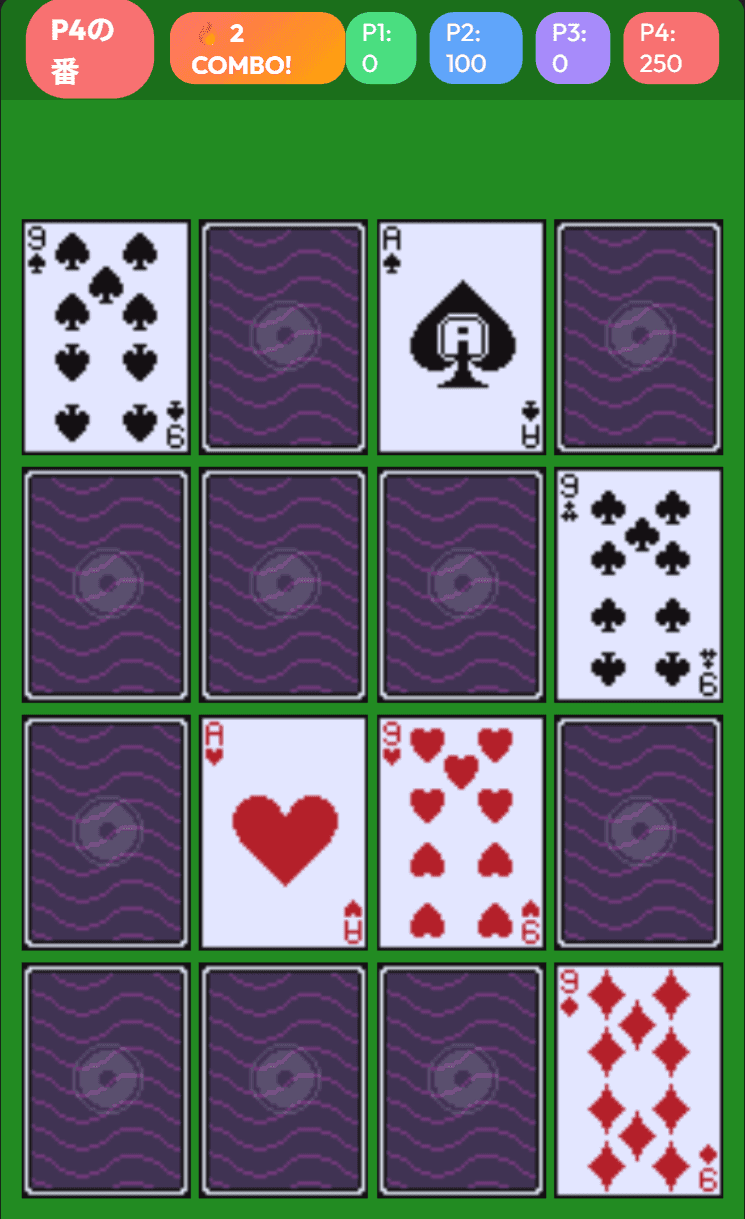
How to Play Memory Match: Rules, Combo Scoring, and Tips to Beat the CPU
What Is Memory Match on Yotsuba Games?

Memory Match is a free browser version of the classic card game also known as Concentration: lay out playing cards face down, flip two at a time, and look for cards with the same number. There is nothing to install and no sign-up required, and it runs on both PC and smartphone.
There are three ways to play: Solo, where you work on your own score; vs Human, where 2 to 4 people take turns on one device; and vs CPU, a one-on-one match against the computer. You can choose from four board sizes, from 8 cards up to a full 52-card deck.
This guide covers the rules, how combo scoring works, the controls on PC and mobile, and strategy tips based on how the game actually works.
Basic Rules
Goal and Winning
Flip two face-down cards. If they show the same number, they form a pair and you score points. The game ends once every pair on the board has been found. In Solo mode your final score is your result; in vs Human and vs CPU, the player with the most points wins. Equal top scores are shown as a draw.
Cards Match by Number Only
Whether two cards match depends only on the rank (A through K); suits don't matter. The cards on the board are picked at random in sets of same-rank pairs, either "spade + heart" or "club + diamond." That means even the 8-, 16-, and 24-card boards can contain four cards of the same number, and in that case any two of them match, such as the 7 of spades with the 7 of clubs. The 52-card full deck always contains all four cards of every number.
Difficulty (Number of Cards)
Pressing one of the Difficulty buttons on the start screen begins a game with that many cards right away.
| Difficulty | Cards | Pairs | Layout |
|---|---|---|---|
| Easy | 8 | 4 | 4 across × 2 rows |
| Normal | 16 | 8 | 4 across × 4 rows |
| Hard | 24 | 12 | 6 across × 4 rows |
| Full Deck | 52 | 26 | 8 across × 7 rows (last row has 4) |
How a Turn Works
- Flip one face-down card.
- Flip a second card.
- If the numbers match, both cards flash, stay face up on the board, and you score. The same player flips again.
- If they don't match, both cards flash red and shake, then turn face down, and play passes to the next player (in Solo mode, you simply keep going).
The bar at the top of the screen shows whose turn it is ("P1's Turn," "🤖 CPU's Turn," and so on) along with each player's score.
Scoring and Combos
Each pair is worth points, and matching several pairs in a row within the same turn raises the multiplier. From the second pair on, a combo indicator such as "🔥 2 COMBO!" appears at the top of the screen.
| Pairs in a row | Multiplier | Points |
|---|---|---|
| 1st | ×1 | 100 |
| 2nd | ×1.5 | 150 |
| 3rd | ×2 | 200 |
| 4th and beyond | ×2.5 | 250 |
For example, four pairs in a row add up to 100 + 150 + 200 + 250 = 700 points. A miss (the end of your turn) resets the multiplier to ×1. Misses never cost you points.
The Three Game Modes
- Solo: You flip every card yourself. There is no time limit and no move limit, so your score comes down to how well you chain combos.
- vs Human: Choose 2, 3, or 4 players. Everyone takes turns on the same screen.
- 🤖 vs CPU: You (P1) against one CPU opponent. Pick a CPU strength of Easy, Normal, or Hard.
How the CPU Levels Differ
The CPU remembers cards that have been revealed and uses that knowledge on later turns. It watches the cards you flip, not just its own. The strength setting changes how much it can remember and how reliably.
| Strength | Memory size | How it remembers |
|---|---|---|
| Easy | Up to 4 cards | Remembers only about half of the cards it sees |
| Normal | Up to 10 cards | Misses roughly one in four cards it sees |
| Hard | Effectively unlimited | Remembers every card it sees |
If the CPU knows where a pair is, it takes that pair first. If it knows where the partner of its first card is, it picks that as the second card. Otherwise it flips at random. Once its memory is full, it forgets the oldest cards first. Like you, the CPU keeps flipping as long as it keeps matching.
Controls
Starting a Game
- Choose a Game Mode on the start screen (Solo is selected by default).
- For vs Human, choose the number of players; for vs CPU, choose the CPU strength.
- Press a Difficulty button to start.
On PC
Click a card with the mouse to flip it. The language button in the top-right corner of the start screen switches the display between English and Japanese.
On Smartphones
Tap a card to flip it. The game uses a portrait layout and automatically scales to fit your screen.
Handy Things to Know
- Taps are ignored while the match/miss animation is playing and during the CPU's turn, so tapping in a hurry won't flip extra cards.
- On the results screen, "Play Again" starts a new game with the same mode and card count (and the same CPU strength in vs CPU). "Back to Title" lets you change the settings.
- The results screen also has links to the other card games and other games on the site.
Strategy Tips
1. Start Each Turn with a Card You Haven't Seen
If your first card is a new one and its number is one you've already seen, you can match it with your second flip for sure. If you open with a card you've already seen and don't know where its partner is, you give up that chance.
2. Remember Numbers, Not Suits
Only the number matters, so there's no need to memorize suits. Because a number can appear four times, the same number may still be on the board after you've taken one pair of it. Don't write a number off just because you've matched it once.
3. Memorize Positions by Row and Column
Cards never move during a game, and matched cards stay on the board face up. Since the grid never shifts, remembering a card as "row 2, third from the left" stays reliable all game long.
4. Take Known Pairs Back to Back
The combo multiplier only climbs when you match pairs consecutively in the same turn, and it drops back to ×1 after any miss. If you know where several pairs are, collect them all before trying new cards so the later ones are worth 150, 200, and 250 points.
5. In Solo, Memorize First and Cash In Later
In Solo mode, misses cost nothing and no one can steal your pairs. Instead of taking pairs as soon as you find them, you can keep memorizing and then collect them all in one long run at the end, where every pair from the fourth onward is worth 250. One wrong guess breaks the chain, so push it only as far as your memory allows.
6. Watch Your Opponents' Cards, Too
Mismatched cards flip back face down after only a brief animation. In vs Human and vs CPU, the cards your opponents miss are clues for you, so keep your eyes on the board even when it isn't your turn.
7. Against a Hard CPU, Show It Fewer New Cards
The Hard CPU remembers every card you reveal. When you don't know where your first card's partner is, flipping a card you've already seen as your second card limits the new information you give the CPU to a single card. The trade-off is that you lose any chance of a lucky match, so weigh it against the number of cards left and the score gap.
8. Use the Four-of-a-Kind Structure in the Full Deck
In the 52-card mode, every number appears four times. When you flip a card, up to three other cards of the same number may still be on the board, and recalling any one of them is enough for a match. The board is big, but tracking positions by number makes long combos possible.
FAQ
How many people can play?
Solo, 2–4 players in vs Human, and one-on-one against the CPU are supported. vs Human is pass-and-play on a single device; there is no online multiplayer.
Do cards with different suits still match?
Yes. Matching is by number only, so the 5 of spades and the 5 of diamonds are a pair.
Can I play in English?
Yes. When you open the game from the English site it starts in English, and you can switch languages any time with the button in the top-right corner of the start screen. Your choice is saved in the browser for next time.
Are scores saved?
Memory Match has no leaderboard or score history; you see your score on the results screen for that game. The only thing saved in your browser is the language setting.
Does the game have sound?
No. There are no sound effects or music, so you can play anywhere without worrying about the volume.
Related Articles
- Released My Second Game: Memory Match! (the release announcement)
- How to Play Klondike Solitaire
- How to Play FreeCell
- How to Play Spider Solitaire
- How to Play Blackjack
- All card games on Yotsuba Games
Give It a Try
Start with Easy (8 cards) to get a feel for the flow. Once you're comfortable chaining combos, move up to more cards or take on the Hard CPU.