How to Play Solitaire (Klondike): Rules, Controls, and 7 Tips to Win
What Is Klondike Solitaire?

Klondike is the single-player card game most people simply call "Solitaire." Using one standard 52-card deck, you sort the cards on the table into alternating red and black runs, and you win once every card has been built up by suit from Ace to King. It became famous as a game bundled with personal computers, and for many players it is still the first thing that comes to mind when they hear the word "Solitaire."
This guide uses the free Solitaire on Yotsuba Games to walk you through the rules, the layout and controls, how scoring works, and seven practical tips for winning more often. It runs right in your browser, so feel free to open a game and follow along.
The Rules
Goal
Move all 52 cards to the four foundations in the top right. Each foundation holds a single suit, built in order from Ace, 2, 3... up to King. When all four foundations hold 13 cards each, you win.
The Layout
| Area | Where | What it does |
|---|---|---|
| Stock | Top left | The 24 cards left after the deal. Click it to turn over one card at a time |
| Waste | Right of the stock | Cards drawn from the stock land here. Only the top card can be played |
| Foundations | Four spots, top right | Your goal. Build each suit from Ace to King |
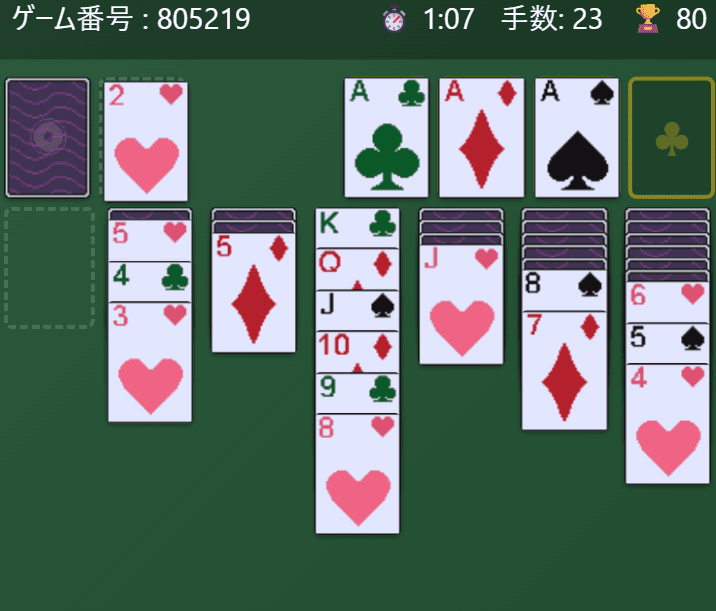
| Tableau | Seven columns below | Dealt 1, 2, 3... up to 7 cards from left to right, with only the top card of each column face up |
At the start, the seven tableau columns receive 1 to 7 cards from left to right, 28 cards in total. Only the front (top) card of each column is face up; everything underneath is face down. The remaining 24 cards form the stock.
Which Moves Are Allowed
- Building on the tableau: A card can go on a card one rank higher of the opposite color (for example, a red 7 on a black 8).
- Moving runs: If face-up cards form a run that alternates colors and drops by one each step, you can pick up the run from any card in it and move it as a group.
- Empty columns: Only a King (or a run that starts with a King) can be placed in an empty column.
- Playing to the foundations: The top card of any tableau column and the top card of the waste can go to a foundation. An empty foundation only accepts an Ace.
- Face-down cards: When the card covering a face-down card is moved away, it turns face up automatically.
- Once a card is on a foundation, it cannot be moved back to the tableau (except by taking the move back with Undo).
Using the Stock
Click the stock to turn over one card at a time onto the waste. When the stock runs out, its slot shows a "↻" symbol; click it to flip the whole waste back into the stock and go through it again. There is no limit on how many times you can cycle through the stock, but every pass from the second one onward costs 100 points.
Winning and Getting Stuck
When every card is on the foundations, a results screen shows your time, number of moves, and score. If you have gone through the stock and nothing can be moved anymore, you are stuck. The game does not announce this for you, so when you run out of ideas, use Undo to go back to an earlier decision point or start a new game.
Controls
In Yotsuba Games' Solitaire you move cards by clicking (or tapping on a phone) rather than dragging. The controls work the same way on a PC and on a smartphone.
Moving Cards
- Only one place to go: Click the card and it moves there automatically.
- Several places to go: The card gets a yellow outline to show it is selected. Then click the column or foundation you want to move it to. Click the same card again to cancel the selection.
- Double-click (double-tap): Sends the top card of a tableau column, or the top card of the waste, to a foundation where it fits.
- Stock: Click to turn over one card. When it is empty, click the "↻" slot to recycle the waste.
Automatic Moves to the Foundations
After each move, any card that can safely go home is sent to the foundations automatically, one card at a time. Aces and 2s always qualify. A card of rank 3 or higher is sent when both foundations of the opposite color have reached at least one rank below it. For example, once both black 4s are on the foundations, no card will ever need a red 5 to build on, so the red 5 can go home without any risk. Because only cards like that are moved, you can leave this to the game.
Buttons and Display
- ↩️ Undo: Takes back your moves one at a time, with no limit on how many. Each Undo, however, costs 15 points. Cards that were sent to the foundations automatically also come back one at a time.
- 🔄 New Game: Starts a fresh deal. A game you abandon this way is recorded as a loss in your statistics.
- Top bar: Shows the game number, elapsed time, number of moves, and current score.
- Game number: Click the number or the 📋 icon to copy it. On the title screen, enter a number from 1 to 999999 to play that exact deal.
- ☆ (Favorite): Saves the current deal to your favorites with an optional comment. Open "⭐ Favorites" on the title screen to replay a saved deal at any time.
How Scoring Works
| Action | Points |
|---|---|
| Waste or tableau to a foundation (including automatic moves) | +10 |
| Waste to the tableau | +5 |
| Turning a face-down card face up | +5 |
| Each pass through the stock from the second onward | −100 |
| Each Undo | −15 |
Your score never drops below zero. When you win, a time bonus is added, and the faster you finish, the bigger it is. A win in exactly 5 minutes earns an 825-point bonus, and a win in 10 minutes earns 400. The results screen shows the base score and the bonus separately, and the total counts toward the High Score in your statistics.
7 Tips for Winning
1. Dig into the columns with the most face-down cards
At the start, the rightmost column hides six face-down cards. A face-down card is useless until it is turned over, so working on the deepest columns first gives you more options as the game goes on. Each card you turn over is also worth 5 points.
2. Look for tableau moves before drawing from the stock
The stock gives you only one card at a time, and only the top card of the waste is playable. If you first turn over face-down cards by moving cards between columns, you create more places for stock cards to land, so fewer of them slip past unused.
3. Choose carefully which King goes into an empty column
An empty column accepts only Kings. When more than one King could move there, compare which one would uncover a face-down card and which one matches the color of the Queen you want to place next. Since an empty column is only useful for a King, there is no need to rush to clear a column until you have a King ready for it.
4. Don't rush cards to the foundations
Cards on the foundations cannot come back to the tableau. Send a red 6 home too early, for example, and a black 5 left on the table may have nowhere to go. The game already moves the cards that are safe to send, so whenever you play another card home by hand, first ask yourself whether you might still need it as a base to build on.
5. When two cards could make the same move, think one step ahead
You will often find two red 8s, a heart and a diamond, that could both go on a black 9. Either move looks the same, but picking the one that turns over a face-down card or empties a column can change how the rest of the game plays out.
6. Keep an eye on how often you recycle the stock
You can go through the stock as many times as you like, but every pass after the first costs 100 points. If you are chasing a high score, use your first pass to organize the tableau and aim to win with as few passes as possible. If you don't care about the score, take your time and go around as often as you need.
7. Study deals with Undo and game numbers
When you get stuck, use Undo to return to a decision point and try a different line. It costs 15 points each time, but it is the quickest way to learn where a game went wrong. Note down the number of a tough deal or add it to your favorites, and you can come back to the exact same layout later.
Frequently Asked Questions
Can every deal be won?
No. Each deal is random, and some deals cannot be won no matter how you play. Klondike is generally considered a game that mixes skill with a fair amount of luck. If you hit a dead end, start a new game and try again.
Can I play with a three-card draw?
Yotsuba Games' Solitaire uses draw one only. There is no limit on how many times you can go through the stock (each pass after the first costs 100 points).
Are my records saved?
Yes. Games played, wins, win rate, current streak, best streak, high score, best time, and fewest moves are saved as statistics, which you can view from "📊 View Stats" on the title screen. Your records are stored in your browser, and if you link a Google account, your statistics and favorites are also saved to the cloud so you can use them across devices. Note that a game counts as a loss if you press New Game partway through, or if you close the page in the middle of a game (it is recorded the next time you open the game).
Can I play on my phone?
Yes. Everything works with taps, so you can play just as you would on a PC. The game uses a portrait layout that scales automatically to fit your screen.
Can I switch the game to English?
Yes. Use the language button in the top right of the title screen to switch between Japanese and English. Your choice is remembered the next time you play.
Related Articles and More Card Games
- Solitaire (Klondike) release announcement
- How to play FreeCell
- How to play Spider Solitaire
- How to play Pyramid Solitaire
- How to play TriPeaks Solitaire
- All card games on Yotsuba Games
Now that you know the rules, why not deal a game?