How to Play FreeCell: Rules, the Move Limit, and 7 Tips to Win
What Is FreeCell?

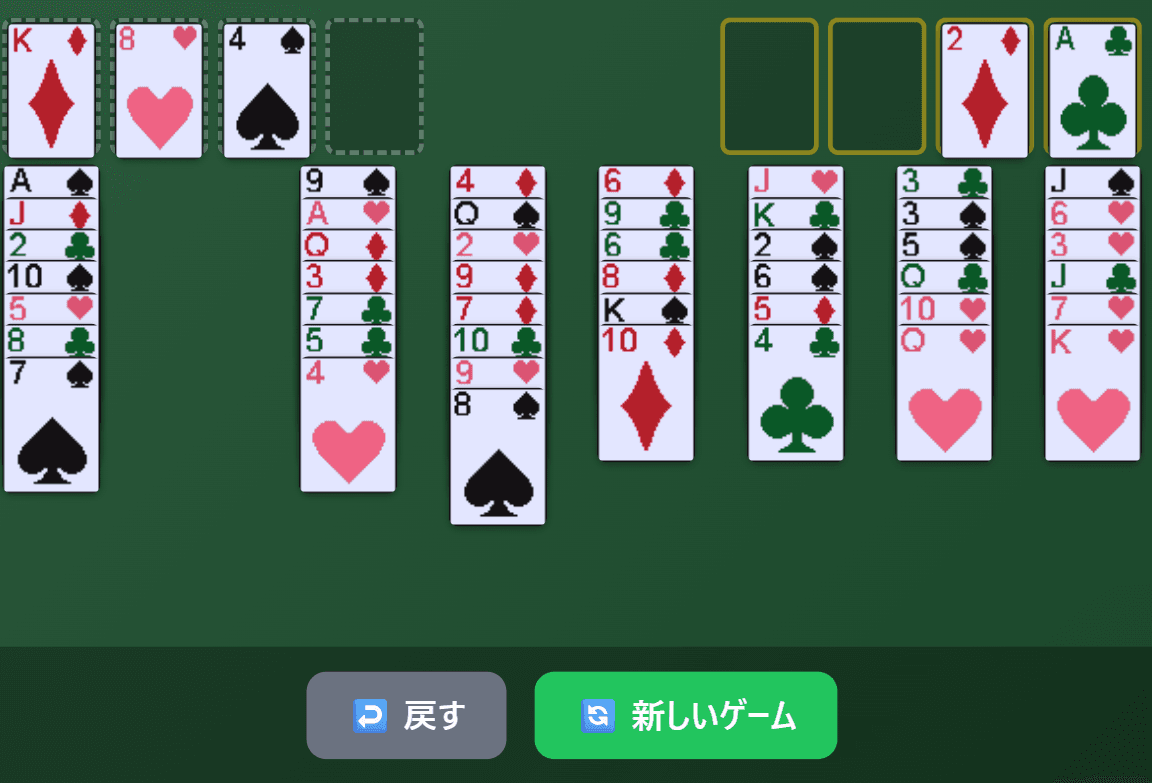
FreeCell is a single-player card game played with one standard 52-card deck. Unlike Klondike (classic Solitaire), every card is dealt face up from the very start. With nothing hidden, the outcome depends far more on planning ahead than on luck. The heart of the game is how you use the four "free cells," spaces where you can park one card each for a while.
This guide uses the free FreeCell on Yotsuba Games to explain the rules, how many cards you can move at once, the controls, how scoring works, and seven tips for winning.
The Rules
Goal
Move all 52 cards to the four foundations in the top right. Each foundation is built by suit in order from Ace, 2, 3... up to King.
The Layout
| Area | Where | What it does |
|---|---|---|
| Free cells | Four spots, top left | Each one can hold any single card temporarily |
| Foundations | Four spots, top right | Your goal. Build each suit from Ace to King |
| Tableau | Eight columns below | All 52 cards are dealt here face up (7 cards in each of the left four columns, 6 in each of the right four) |
There is no stock in FreeCell. Every card is already on the tableau when the game begins.
Which Moves Are Allowed
- Building on the tableau: A card can go on a card one rank higher of the opposite color (for example, a red 8 on a black 9).
- Empty columns: Any card can be placed in an empty column. This is a big difference from Klondike, where only Kings are allowed.
- Free cells: An empty free cell can hold any one card. A card in a free cell can later move to the tableau or a foundation if the rules allow.
- Playing to the foundations: Add the next card of the same suit, one at a time. An empty foundation only accepts an Ace. Cards on the foundations cannot be moved again.
- Moving runs: If the front of a column holds a run that alternates colors and drops by one each step, you can move it to another column as a group, up to a limit explained below.
How Many Cards Can You Move at Once?
You cannot move a run of any length in one go. In Yotsuba Games' FreeCell, the limit is calculated like this:
Cards you can move = (empty free cells + 1) × (empty columns + 1)
One catch: when the destination is itself an empty column, that column does not count as empty. Here are some common cases.
| Empty free cells | Empty columns | Onto a column with cards | Into an empty column |
|---|---|---|---|
| 0 | 0 | 1 card | — |
| 2 | 0 | 3 cards | — |
| 4 | 0 | 5 cards | — |
| 2 | 1 | 6 cards | 3 cards |
| 4 | 1 | 10 cards | 5 cards |
| 4 | 2 | 15 cards | 10 cards |
Some guides describe a formula where each extra empty column doubles the number of cards. Yotsuba Games' FreeCell uses the multiplication above instead, so with two or more empty columns you may be able to move fewer cards than that formula suggests.
Winning and Getting Stuck
You win when all 52 cards are on the foundations. If no legal move is left at all, "⚠️ No Moves!" appears at the top of the screen. When you see it, use Undo to go back to an earlier position or start a new game.
Controls
In Yotsuba Games' FreeCell you move cards by clicking (or tapping on a phone) rather than dragging.
Moving Cards
- Selecting: Click a card on the tableau to select it together with every card in front of it; a yellow outline shows the selection. Click a card in the middle of a run to pick up the run from that point (you cannot select from a position where the cards don't form a valid run).
- Choosing a destination: With cards selected, click the target column, free cell, or foundation. Clicking somewhere the cards can't go simply cancels the selection.
- Smart move: If the card or run you click fits in exactly one column that already has cards, it moves there right away without being selected first. Cards in free cells work the same way. Empty columns are not considered for this, so to use an empty column, select the cards first and then click the empty column.
- Cards that can go to a foundation: A single click selects them. Then click the foundation, or double-click to send them.
- Double-click (double-tap): A shortcut that sends the front card of a column, or a card in a free cell, to a foundation or an empty free cell. When you specifically want a card on a foundation, select it and then click the foundation to be sure.
Automatic Moves to the Foundations
- Aces are sent to the foundations as soon as they reach the front of a column or a free cell.
- Cards from 2 upward are sent automatically after each of your moves once both foundations of the opposite color have reached at least two ranks below that card (2s always qualify).
- When every column has become a single-suit run going down one rank at a time, the game clears the remaining cards to the foundations for you.
Because the game handles the tedious cleanup, you can concentrate on building the board.
Buttons and Display
- ↩️ Undo: Takes back your moves one at a time with no limit, including cards that were moved to the foundations automatically. The number of Undos you used is shown on the results screen and affects your score.
- 🔄 New Game: Starts a fresh deal. A game you abandon this way is recorded as a loss in your statistics.
- Top bar: Shows the game number, elapsed time, and number of moves. The timer starts when you make your first move.
- Game number: Click the number or the 📋 icon to copy it. On the title screen, enter a number from 1 to 999999 to play that exact deal.
- ☆ (Favorite): Saves the current deal to your favorites with an optional comment. Open "⭐ Favorites" on the title screen to replay a saved deal at any time.
How Scoring Works
Your score is calculated when you win, as follows.
| Item | Points |
|---|---|
| Base score | 1000 |
| Move bonus | Up to 200 (minus 2 for every move beyond 52, reaching 0 at 152 moves or more) |
| Time bonus | +300 within 3 minutes / +150 within 5 minutes / +50 within 10 minutes |
| Undo penalty | −10 per Undo |
Automatic moves to the foundations count as moves too. Sending 52 cards home always takes 52 moves, so the key to a high score is cutting down on every other move.
7 Tips for Winning
1. Before you move, find the Aces and 2s
Every card in FreeCell is visible, so it pays to study the board before your first move. An Ace goes home as soon as it is uncovered, and the 2 of the same suit follows automatically. Count how many cards sit on top of each Ace and 2, and start with the ones you can free in the fewest moves. The further the foundations grow, the more cards the game can clear for you.
2. Keep your free cells as empty as possible
Free cells are handy, but every one you fill lowers the number of cards you can move at once. With no empty columns, four empty free cells let you move 5 cards; with two of them filled, the limit drops to 3. Only park a card in a free cell if you expect to move it out again within the next few moves, and you will avoid painting yourself into a corner.
3. Make emptying a column your goal
An empty column accepts any card and greatly increases how many cards you can move. With four empty free cells, you can move 5 cards when no column is empty, but 10 when one column is. Early on, aim to clear one of the short columns, such as the right-hand columns that start with only six cards.
4. Watch the limit when moving a long run into an empty column
When the destination is an empty column, that column does not count toward the limit. With four empty free cells and one empty column, you can move 10 cards onto a column that has cards, but only 5 into the empty column. Before moving a long run, check whether it can go onto a column with cards instead.
5. When two cards could make the same move, choose by what lies beneath
You will often find two red 8s, a heart and a diamond, that could both go on a black 9. Either move looks the same, but choosing the one that uncovers an Ace, a 2, or a card that helps clear a column makes the rest of the game much easier.
6. Don't rush cards to the foundations
Cards on the foundations cannot come back. Send a red 4 home too early, for example, and a black 3 left on the table may have nowhere to go. Whenever you play a card to a foundation by hand, first check whether you might still need it as a base to build on.
7. Study deals with Undo and game numbers
When you sense a dead end coming, use Undo to return to a decision point and try another line. Since every card is visible in FreeCell, the same game number always gives you the same deal to retry as often as you like. Add tough deals to your favorites and work out where you went wrong; it is one of the fastest ways to improve.
Frequently Asked Questions
Can every deal be won?
FreeCell is generally said to be a game in which the vast majority of deals can be solved. That said, there is no guarantee that every deal can be won. If a deal really seems impossible, moving on to a new game is a perfectly good option.
Why can't I move a long run?
Because there is a limit on how many cards you can move at once: (empty free cells + 1) × (empty columns + 1), and an empty column you are moving into does not count. Free up a cell or a column and try again.
Are my records saved?
Yes. Total games, wins, win rate, current streak, high score, best time, and fewest moves are saved as statistics, along with your total moves and total play time. You can view them from "📊 Stats" on the title screen. Your records are stored in your browser, and if you link a Google account, your statistics and favorites are also saved to the cloud so you can use them across devices. A game you leave unfinished is counted as a loss when you start your next game.
Can I play on my phone?
Yes. Everything works with taps, and the screen scales automatically to fit your device.
Can I play the same deal as a friend?
Yes. Just share the game number and you will both get the same deal. You can also share a favorite deal with the 📤 button, and shared numbers appear in the "Community Favorites" section of the game page, where you can try deals other players have recommended.
Related Articles and More Card Games
- FreeCell release announcement
- How to play Solitaire (Klondike)
- How to play Spider Solitaire
- How to play Pyramid Solitaire
- How to play TriPeaks Solitaire
- All card games on Yotsuba Games
Now that you know the rules and the move limit, why not deal a game?