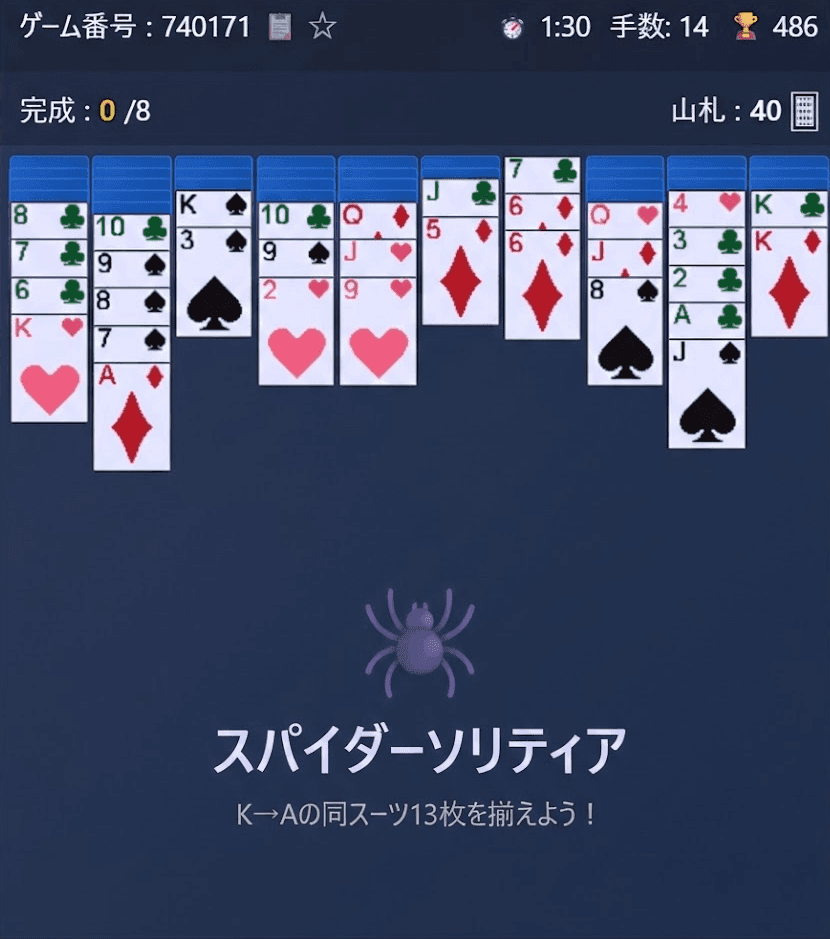
How to Play Spider Solitaire: Rules, 1/2/4-Suit Modes, and 7 Tips
What Is Spider Solitaire?

Spider Solitaire is a single-player card game played with 104 cards, the equivalent of two decks, laid out in ten columns. Whenever you line up all 13 cards of one suit in order from King down to Ace, that set is removed from the table. Remove all eight sets and you win. Among the many kinds of solitaire, Spider stands out for how much thought goes into building up your columns.
This guide uses the free Spider Solitaire on Yotsuba Games to explain the rules, the differences between the 1-, 2-, and 4-suit modes, the controls, how scoring works, and seven tips to help you clear more games.
The Rules
Goal
Build runs of 13 cards of the same suit in order from King, Queen, Jack... down to Ace. As soon as a complete run sits at the front of a column, it is removed automatically. Remove all eight sets to win. The "Sets" counter on screen shows how many you have completed.
The Layout
| Area | Where | What it does |
|---|---|---|
| Tableau | Ten columns in the middle | 54 cards are dealt: 6 in each of the left four columns and 5 in each of the right six. Only the front card of each column is face up |
| Stock | Right side of the info bar at the top | The remaining 50 cards. Each deal adds one card to all ten columns, for five deals in total |
| Sets | Left side of the info bar at the top | The number of completed sets you have removed (eight to win) |
Difficulty: 1, 2, or 4 Suits
Choosing a difficulty on the title screen starts the game right away. Every mode uses 104 cards; only the number of suits changes.
| Difficulty | Suits used | What it means |
|---|---|---|
| 1 Suit (Beginner) | Spades only (8 sets of 13) | Every card shares one suit, so any descending run can be moved as a group |
| 2 Suits (Intermediate) | Spades and hearts (4 sets each) | Runs that mix suits can no longer be moved as a whole |
| 4 Suits (Advanced) | All four suits (2 sets each) | Building single-suit runs is hard, so careful planning matters most |
Which Moves Are Allowed
- Building on the tableau: A card can go on any card one rank higher, regardless of suit or color (for example, a 7 of spades on an 8 of hearts).
- Moving runs: Only runs of the same suit going down one rank at a time can be moved as a group, and there is no limit on their length. If a run mixes suits, you can only move the part in front of where the suits change.
- Empty columns: Any card can be placed in an empty column.
- Face-down cards: When the card covering a face-down card is moved away, it turns face up automatically.
Dealing from the Stock
Click the "📥 Deal" button, or the "Stock" counter in the info bar, to deal one face-up card onto each of the ten columns. However, you cannot deal while any column is empty; the game shows a message telling you so. The info bar also shows how many cards are left in the stock.
Winning and Getting Stuck
When all eight sets are removed, a results screen shows your score, time, and number of moves. If the stock is used up and no card can be moved, you are stuck. The game does not announce this for you, so when you run out of ideas, use Undo to go back to a decision point or start a new game.
Controls
In Yotsuba Games' Spider Solitaire you move cards by clicking (or tapping on a phone) rather than dragging.
Moving Cards
- Selecting: Click a face-up card to select it together with every card in front of it; the selection glows. You can only select cards that form a same-suit run going down one rank at a time.
- Choosing a destination: With cards selected, click a card in the target column (or an empty column). If the cards can't go there, the selection is cancelled. Clicking another card in the same column changes your selection instead.
- Double-click (double-tap): Click the same card twice quickly to move it, along with the run in front of it, to a column where it fits. Columns where it would land on the same suit are preferred; if there are none, columns of a different suit and empty columns become candidates. When there are several candidates, the game picks one of them.
Buttons and Display
- ↩️ Undo: Takes back actions one at a time with no limit. Besides normal moves, you can also undo a deal from the stock or a completed set being removed.
- 📥 Deal: Deals one card onto each of the ten columns.
- 🔄 New Game: Returns to the title screen so you can pick a difficulty again. A game left unfinished is recorded as a loss when you start the next one.
- Top bars: Show the game number, elapsed time, number of moves, score (🏆), completed sets, and cards left in the stock.
- Game number: Click the number or the 📋 icon to copy it. On the title screen, enter a number from 1 to 999999 to play that exact deal. A game started this way uses the difficulty you chose most recently (or 1 Suit if you haven't picked one since opening the page). The same number produces a different deal at a different difficulty.
- ☆ (Favorite): Saves the current deal to your favorites with an optional comment. The difficulty is saved along with it, so the ▶ button in "⭐ Favorites" on the title screen replays the deal at the same difficulty.
How Scoring Works
| Item | Points |
|---|---|
| Starting score | 500 |
| Each move or deal from the stock | −1 |
| Completing a King-to-Ace set of one suit | +100 |
Using Undo does not give back the points or moves you have already spent (and undoing a completed set takes its 100 points away again). The fewer moves you need to win, the higher your score.
7 Tips for Clearing More Games
1. Start with 1 Suit
In 1 Suit mode every card is a spade, so any run that goes down one rank at a time can be moved as a group. Learn the basics, such as the order of your moves and when to deal from the stock, in 1 Suit first, then step up to 2 and 4 Suits.
2. Build on the same suit whenever you can
You are allowed to build on a different suit, but a run that mixes suits can no longer be moved as a whole. When you have a choice, place the card on the same suit. The longer your same-suit runs grow, the closer you are to completing a set.
3. Make turning over face-down cards a priority
At the start, each of the left four columns hides five face-down cards and each of the right six hides four. A face-down card is useless until it is turned over, so favor moves that reveal one. A column with only a few face-down cards left is a great chance to create an empty column.
4. Make the most of empty columns
Any card can go into an empty column, which makes it a powerful temporary space for reorganizing runs. You can use it to separate a mixed-suit run or to relocate a long run that starts with a King. Remember that a King can't be placed on any other card, so an empty column is the only place a King can move to.
5. Tidy up before you deal
Dealing puts a new card on the front of all ten columns, which can split up runs you have carefully built. Make every useful move before you deal and gather your same-suit runs together. Also, since you can't deal while a column is empty, you will need to put something into any empty column first, and choosing which card to put there is part of the strategy.
6. Treat double-click as "let the game decide"
Double-clicking is convenient, but when there are several possible destinations the game picks one, so the cards may not end up where you intended. For important moves, select the cards and then click the destination yourself.
7. Use Undo to test ideas
Undo has no limit and can even take back a deal from the stock. Points and moves you have spent are not refunded, though, so go easy on it if you are chasing a high score. If clearing the game matters more, you can use it to see what a deal brings out and then step back to try a different plan.
Frequently Asked Questions
Can every deal be won?
Not necessarily. It is generally said that the game gets harder as the number of suits goes up, and 4 Suits in particular is a tough challenge. If you feel you have landed on a deal that can't be won, simply start a new game.
Why can't I deal from the stock?
You can't deal while any column is empty. Place a card in the empty column first, then try again. You also can't deal once the stock has run out.
Are my records saved?
Yes. Games played, wins, win rate, current streak, best streak, high score, best time, and fewest moves are saved separately for each difficulty. Open "📊 Statistics" on the title screen and switch between difficulties with the tabs at the top. Your records are stored in your browser, and if you link a Google account, your statistics and favorites are also saved to the cloud so you can use them across devices.
Can I play on my phone?
Yes. Everything works with taps. The game uses a portrait layout that scales automatically to fit your screen.
Related Articles and More Card Games
- Pyramid Solitaire and Spider Solitaire release announcement
- How to play Solitaire (Klondike)
- How to play FreeCell
- How to play Pyramid Solitaire
- How to play TriPeaks Solitaire
- All card games on Yotsuba Games
Start with 1 Suit and deal your first game.