Confirmed Version: v1.19.8
Overview
Node that expands or shrinks the canvas size to create padding. Maintains the original image size while adjusting only the canvas size.
Parameters
| Parameter | Description |
|---|---|
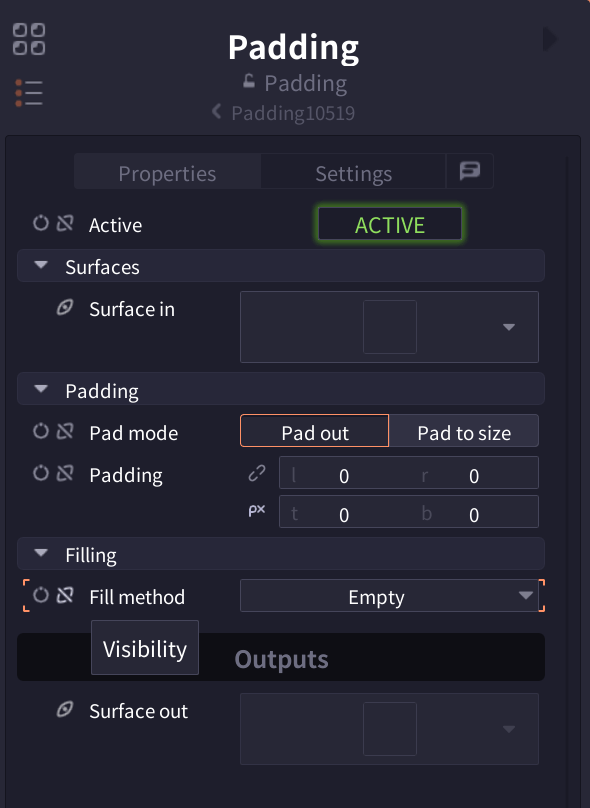
| Active | Toggle node enabled/disabled (Default: ACTIVE) |
| Pad mode | Pad out (individual padding) / Pad to size (target size) |
| Padding | Padding for each side (left/right/top/bottom, Pad out mode) |
| Target dimension | Target canvas size (Pad to size mode) |
| H/V alignment | Horizontal/Vertical alignment (0-1, Pad to size mode) |
| Fill method | Empty/Solid/Pixel Expand (padding fill method) |
| Fill color | Fill color (Solid mode) |
Interface
Pro Tips
- Sprite sheets: Use Pad to size for uniform dimensions
- UI layout: Reserve placement area with individual padding
- Effect preparation: Add workspace for processing
- Crop function: Use negative values to crop images
Related Nodes
- Scale: Change image size itself
- Crop: Crop image to specified area (Coming soon)
- Canvas: Adjust canvas size (Coming soon)
- Transform: Adjust position, rotation, and scale