Confirmed Version: v1.19.8
Overview
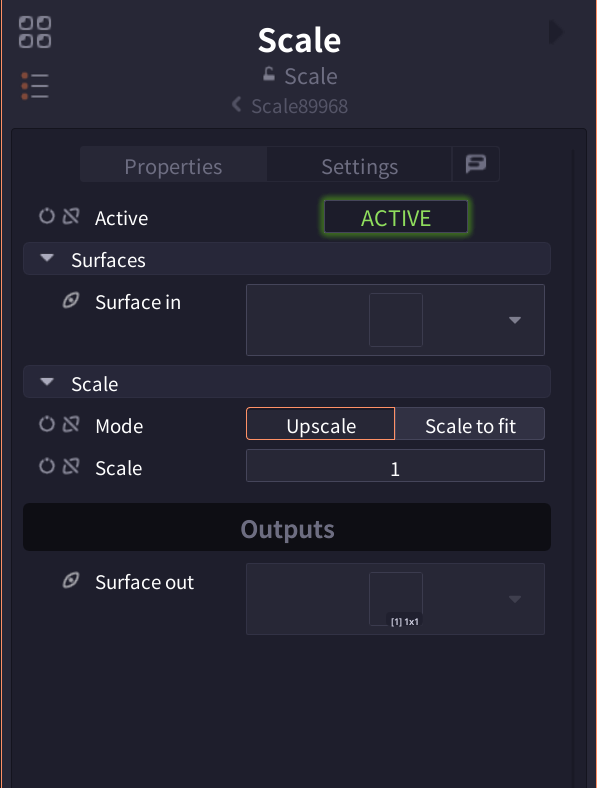
Scale node is a basic transformation node for scaling images. It provides two modes: simple scaling by magnification and automatic scaling to fit target size, supporting various use cases.
Parameters
| Parameter | Description |
|---|---|
| Active | Toggle node enabled/disabled (Default: ACTIVE) |
| Mode | Upscale (magnification) / Scale to fit (target size) |
| Scale | Scale factor (Upscale mode, Default: 1) |
| Fit Mode | Stretch/Minimum/Maximum (Scale to fit mode) |
| Target dimension | Target size X,Y (Scale to fit mode) |
Interface
Pro Tips
- For pixel art, use integer multiples (2, 3, 4, etc.)
- For UI assets, downscaling from maximum resolution provides better quality
- Minimum mode is suitable for image gallery display
- Maximum mode is convenient for background image fitting
Related Nodes
- Scale Algorithm: Select advanced scaling algorithms (Coming soon)
- Downscale: Node specialized for downscaling (Coming soon)
- Transform: Comprehensive transformation including rotation and distortion
- Crop: Crop images (Coming soon)