Confirmed Version: v1.19.8
Overview
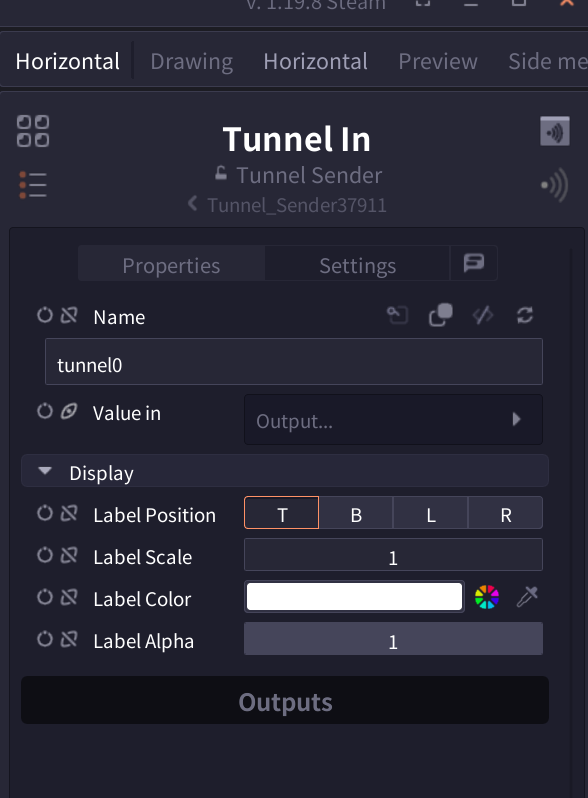
Tunnel In node is a sender node that enables "wireless connection" within the node graph. Used in pair with Tunnel Out node, it can transmit data without physical connections by setting the same name. Useful for organizing complex node graphs and connecting distant nodes.
Parameters
| Parameter | Description |
|---|---|
| Name | Tunnel identifier name (Default: "tunnel0") |
| Value in | Input port for data to transfer |
| Label Position | Label display position (T/B/L/R) |
| Label Scale | Label size (Default: 1) |
| Label Color | Label text color |
| Label Alpha | Label transparency (0-1) |
Interface
Tunnel Panel
Click the wireless icon (top) to open the Tunnel Panel:

- Tunnel List: View all created tunnels
- Create New Tunnel: Use "Create Tunnel" button at bottom
- Jump to Node: Click icon on right side of each tunnel
- Connection Status: Visually check In/Out relationships
Pro Tips
- Click wireless icon (bottom) to auto-generate corresponding Tunnel Out
- Use meaningful tunnel names ("player_position" etc.)
- One Tunnel In can broadcast to multiple Tunnel Outs with same name
- Use color coding and label settings to improve visibility
Related Nodes
- Tunnel Out: Receiver node used in pair (Coming soon)
- Display Text: Annotation node helpful for organizing node graphs
- Frame: Group and organize nodes (Coming soon)